
FUEL MANAGEMENT / GROUND TO AIRCRAFT
Every flight starts
with controlled
refuelling.
Ground refuelling and onboard fuel monitoring for fuel-powered UAVs.
Bring EL-FuelStation, EL-FuelCan 20, FuelSwitch and FuelSens together around your platform.
Bring EL-FuelStation, EL-FuelCan 20, FuelSwitch and FuelSens together around your platform.
1 L/min
MAXIMUM REFUELLING RATE
MAXIMUM REFUELLING RATE
6–12 V
STATION SUPPLY
STATION SUPPLY
6 mm
STATION TUBE CONNECTION
STATION TUBE CONNECTION
4 components
ONE CONNECTED WORKFLOW
ONE CONNECTED WORKFLOW
THE SYSTEM
From the fuel container
to the onboard fuel indication.
Choose the components around your tank layout and telemetry architecture. Keep ground handling and onboard measurement connected through a defined refuelling procedure.
01 / GROUND REFUELLING
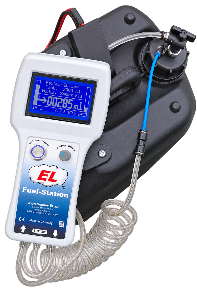
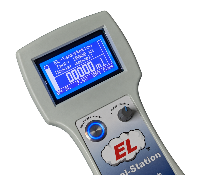
EL-FuelStation
Portable filling and defuelling with measured fuel volume, pressure monitoring and adjustable pump output. Select the operating mode for your tank system.
02 / FILL DETECTION
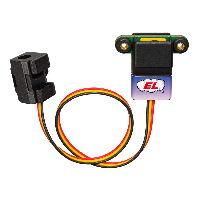
FuelSwitch
Detects fuel in the overflow line and signals the station to stop. A brief reverse cycle then clears the overflow line. Connects to the station via MR30.
03 / ONBOARD MONITORING
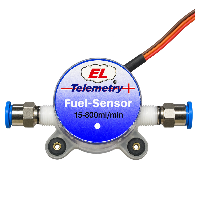
FuelSens PRO
Measures fuel flow between tank and engine. Fuel remaining is calculated from consumption. The PRO version supports an automatic full-tank reset through FuelSwitch after refuelling.
04 / FUEL STORAGE
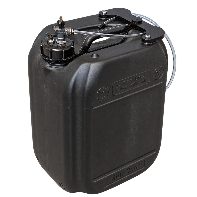
EL-FuelCan
Six-layer canisters with an integrated barrier to reduce fuel permeation, moisture ingress and odour. Supplied as a standalone canister or fully equipped for use with our
EL-FuelStation.
EL-FuelStation.
Up to 1 L/min · 10 stored profiles
For tanks with an overflow line
PowerBox P²BUS · Jeti EX-BUS
10 or 20 litres
OPERATIONAL WORKFLOW
A defined process.
A clear starting point for the next flight.
01 / PREPARE
Connect & select
Connect the fuel line and select the settings for the aircraft and its tank configuration.
02 / REFUEL
Monitor the fill
The station measures the delivered fuel. With FuelSwitch, overflow detection provides the stop signal
03 / COMPLETE
Establish full
Use the compatible PRO sensor reset connection to establish the full-tank reference.
04 / OPERATE
Track consumption
The onboard sensor measures flow. Integrate its data into your supported telemetry architecture.
ENGINEERING INTEGRATION
Start with your aircraft.
Define the right configuration.
Tell us your tank type, fuel, capacity and expected engine consumption. We can discuss the station setup, sensor selection and connections for your application.
For autopilot or CAN integration, the complete signal path needs to be checked against your equipment. Share your intended interface when requesting a system configuration.
Talk through your requirements ↗
Station flow rate | Up to 1 L/min |
Station power | 6–12 V DC |
Station connections | 6 mm tubing / XT60 / MR30 |
Tank configurations | Overflow tanks; suitable bladder tanks with the matching operating mode |
PRO sensor telemetry | PowerBox P²BUS or Jeti EX-BUS |
PRO sensor readings | Flow, calculated fuel remaining, reserve |
EL-FuelCan 20 | 20 L nominal / approx. 22.5 L overflow volume; fully equipped |
SmartFill requires bladder tanks rated by their manufacturer for at least 100 mbar overpressure. Confirm component compatibility and operating parameters for each installation.
YOUR NEXT PLATFORM
Let’s define your fuel workflow.
Send your tank configuration, fuel type and telemetry requirements.
Gunter Zielke is your direct contact for product and integration enquiries.